Free music for your business — and a globe on the wall
A cafe, a bar, a restaurant, a waiting room, a hotel lobby — they all need music, and they all need atmosphere. JSM Radio gives you both, free: 30,000+ live stations — LoFi, jazz, dance, hip-hop, and more — and a fullscreen globe you put on the TV or screen, so your customers see where the music is coming from. No account, no app, no ads. Here's how to set it up.
The music is the easy part. The globe is the part your customers will actually notice: a spinning world map on the wall, gold dots for stations, a green ring marking the one that's playing right now. When the station changes, the globe follows it — it drifts to the new place and centres on it. Leave it alone for 30 seconds and it starts slowly rotating on its own. It's a living picture, not a screensaver.
Pick the mood for the time of day
One page, one tap per mood. The genre chips do the work — no playlist to build, no subscription to manage.
Morning — LoFi & chill
LoFi, chillout, ambient. Quiet enough for coffee and conversation, warm enough that the room doesn't feel empty. Start the day here.
Lunch & dinner — jazz & soul
Jazz, soul, bossa nova, classical. It sits under the food and the talk instead of competing with it — the sound of a room that knows what it's doing.
Evening — dance & hip-hop
Dance, hip-hop, electronic, pop. When the room fills up and the energy rises, turn the tempo up with it. One tap on a genre chip and the whole room changes.
Every genre is a live station, not a loop — real DJs, real presenters, real radio from somewhere in the world. And if your regulars have a favourite, save it: tap to play, hold a preset button for two seconds, and it's one tap from then on. Six presets, so the morning, lunch, and evening sounds can each have their own button.
Put the globe on your screen
This is what makes it different from a speaker in the corner. Open JSM Radio on the TV, the tablet, or any screen in the room, open the globe, and tap the Full screen button (the monitor icon, next to Maximize, top-right of the globe). The browser chrome — address bar, tabs — disappears, and the globe fills the whole screen. Your customers see a world map with the playing station ringed in green, and when you change the station the globe drifts to the new place and follows it.
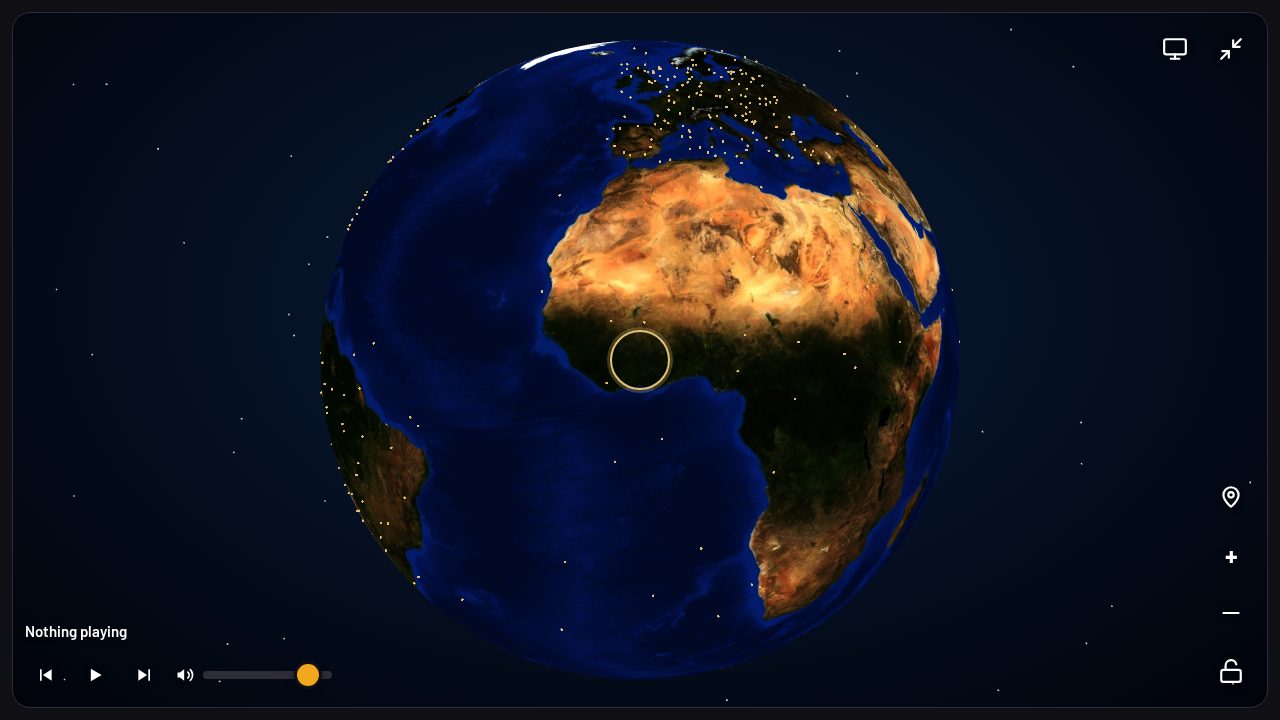
- Full screen hides the chrome. Maximize only fills the browser window; Full screen hides the address bar and tabs too, so the globe is the only thing on the screen. Tap the button again, press Escape, or the TV remote's Back button to exit.
- The globe follows the music. Change the station and the globe re-centres on the new one — even after someone spun it around. Leave it alone for 30 seconds and it starts slowly rotating on its own.
- It never stops the music. The globe is a panel over the player — spin it, zoom it, tap a dot, and the station keeps playing underneath.
- One screen, all day. Set it in the morning and it runs: the music plays, the globe moves, and the room has something to look at.
Set it up in three steps
Open JSM Radio on your screen
Any browser, any TV or tablet — go to jsm-radio.com. No account, no app to install, nothing to sign in to.
Pick a genre or a station
Tap a genre chip — LoFi, jazz, dance, hip-hop — or search for a station by name, city, or language. Save your house sounds as presets.
Open the globe, tap Full screen
Open the globe, tap the Full screen button (monitor icon, next to Maximize), and the room has its picture. Change the genre whenever the mood changes.
It works beyond cafes, too
The same setup — free music plus a globe on the screen — fits anywhere people wait, sit, or gather. A few more places it works:
- Waiting rooms — clinics, the dentist, the vet, the auto shop. People wait anxiously; calm music (LoFi, jazz, classical) plus a globe to look at is kinder than a silent room or a news channel.
- Hotels & lobbies — the globe is travel. Guests from everywhere, music from everywhere. A globe in a lobby is the most natural fit of all.
- Salons & barbershops — clients sit 30–60 minutes in the chair. Music plus a screen to watch beats staring at a mirror.
- Spas & yoga studios — ambient and calm music, and the slow-spinning globe is itself a calming visual.
- Gyms — high-energy (dance, hip-hop, electronic) for the floor, and the globe on the reception screen.
- Shops & bookstores — music sets the buying mood. A bookstore with jazz is a classic for a reason.
- Offices & coworking spaces — LoFi for focus, and the globe in the break room.
- Airports & lounges — globe equals travel. A departure lounge screen is the perfect home for it.
One honest note: check your local rules
The player and the stream are free — no account, no ads, no subscription. But playing music in a cafe, bar, or restaurant is a public performance, and in most countries that needs a licence from the local music rights organisation — SOCAN in Canada, ASCAP and BMI in the US, and equivalents elsewhere. That's separate from the radio itself, and it's the business's responsibility, not the player's. Check your local rules before you turn the volume up.
Frequently asked questions
Do I need an account or a subscription?
No. Open jsm-radio.com in any browser and press play. No account, no app, no ads, no subscription.
Can I leave it playing all day?
Yes. Pick a genre or a station, and it plays. Change the genre when the mood changes — one tap on a chip.
Will the globe keep moving on the screen?
Yes. The globe follows the station that's playing — change the station and it drifts to the new place. Leave it alone for 30 seconds and it starts slowly rotating on its own.
How do I put the globe on the TV without the browser bar?
Open the globe, then tap the Full screen button — the monitor icon next to Maximize, top-right of the globe. It hides the address bar and tabs so the globe fills the whole screen. Tap it again, press Escape, or the TV remote's Back button to exit.
Does it work for businesses other than cafes and restaurants?
Yes — waiting rooms, hotel lobbies, salons, spas, gyms, shops, offices and airport lounges all work the same way: free music plus a fullscreen globe on the screen. The same three steps set it up.
Can my customers request a station?
They can point at the globe and ask. Tap any dot to play that station — the globe follows it. Or search by name, city, genre, or language.
Open JSM Radio — free, no account, no ads30,000+ live stations and on-demand tracks, on any screen.